


by Dan Slater
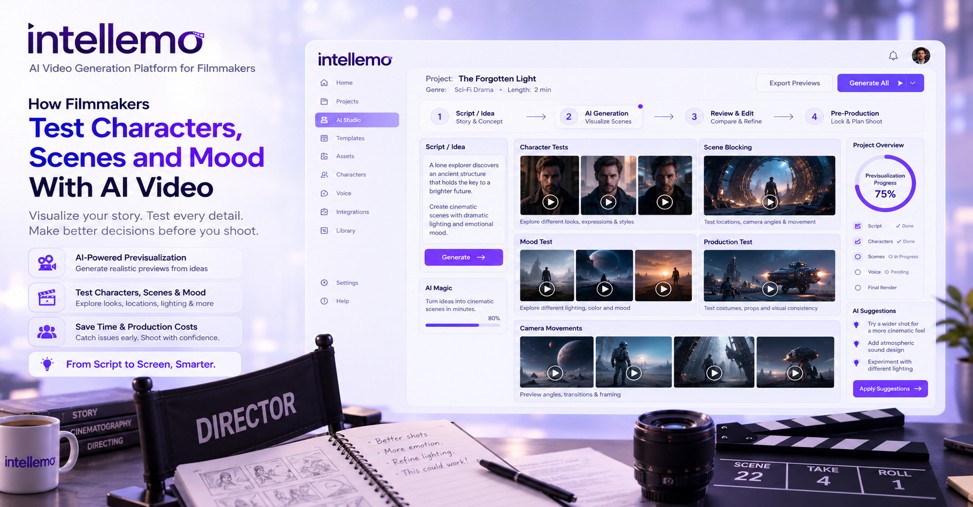
All filmmakers have experienced making a commitment before fully understanding the content. A costume that doesn’t look like what the designers intended. A set that’s gorgeous to shoot, but that doesn’t suit the script. The only way to avoid these surprises has been to take the time to previsualise, using storyboards, mood boards, animatics, and, if budget permits, a test shoot, if any. AI video tools have taken a new approach to that process. They let filmmakers generate moving footage of a character, a scene, or a visual tone before a single crew member is booked. Intellemo AI can help filmmakers turn these early concepts into visual test footage.
Why Visual Testing Matters Before Production Starts
There are more than financial costs of getting the look/feel wrong on set. The schedule is already packed, and a reshoot of the wardrobe is an additional expense. When a director is faced with a lighting setup that doesn’t fit the tone of the story, he or she will have to make some compromises or begin the shoot over again. This risk has always been mitigated by static previz tools like mood boards and storyboards but is limited by the tools’ inherent characteristics. They have purpose, not movement. A character sketch doesn’t give a director any idea if an actor is going to be able to look convincing as a character when he’s on camera, and a colour palette board won’t tell the director how light will bounce off a person’s face in a shot that’s moving.
AI storytelling video generation fills in some of that gap. It gives the filmmaker a real moving scene from a description so that they will know whether the concept is viable in motion or not. This is a type of test that’s much more useful than a simple photo or treatment that’s in the written word.
Testing Character Look and Performance Before Casting Is Locked
Character testing is one of the more usable applications that are coming into fruition in the early stages. When a director is working on a script, he can give a description of a character’s age, build, clothes and attitude and then create short clips and watch how the character would move and what his or her attitude would be. It’s not the casting of an actor. It’s more of a sort of moving sketch pad that is visual.
This is more important for filmmakers than it seems at first glance when organising a project pitch or creating a look book for investors. A written character description is too vague to be useful to those who read it. A brief clip of mock footage, no matter how rough, helps to establish a more common ground for the collaborators. It can also help a director determine before the audition process even starts what type of physical attributes he or she will want in an actor.
AI character consistency video generators are also being employed by some filmmakers to swiftly test out wardrobe and styling choices across multiple iterations without scheduling in fittings and photos that may be abandoned in a day. Some newer workflows also allow an individual storyboard scene to be refined, such as changing a character’s outfit, expression, hairstyle, background, lighting, or camera angle, without regenerating every other scene. This can make visual experimentation more controlled when the rest of the sequence is already working.
Previsualising Scenes and Blocking Without a Crew
Traditionally, blocking is about working out a space in a rehearsal or about the imagination of a director, which is drawn on a storyboard. AI video tools provide a solution for this. The filmmaker can write the scene description, such as the camera movement, angle and rough staging, and then create a version of it to determine if the composition actually works and save the crew day if it doesn’t.
This is helpful for unusual blocking and camera movements, for example, where a director is not sure if something makes sense on the screen or in his/her head. It isn’t a substitute for a technical recce and rehearsal with the cast but can highlight any obvious issues early. If it doesn’t seem to make sense in a rough pass generated by AI, it most likely will not do so on the day.
The cost of each hour on set and the costs of previz are much less on a laptop than on location, and independent filmmakers who are under a crew day limit are finding this to be of great benefit. More structured AI production workflows can also introduce review points for scripts, narration and storyboards, giving filmmakers a chance to correct an issue before it carries into the next production stage.
Establishing Cinematic Mood and Colour Language Early
One of the most difficult things to communicate prior to a movie being filmed is mood. The directors and cinematographers frequently use reference movies to describe what they want; for instance, when trying to explain the lighting in a movie or its colour grade, they simply point to another movie. One alternative they have is AI cinematic video tools which can produce short test videos that mimic a specific mood, such as a thriller’s icy, blue tones or a coming-of-age drama’s grainy atmosphere.
This kind of testing can be helpful to a director and a director of photography to ensure that they are on the same page before the principal photography starts, rather than relying on a still photograph or a verbal description. It can also bring up conflicts early on, before the scene has even been filmed, which is much preferable.
None of this is a substitute for the art of filming. A generated clip can’t replace the actual light behaviour on a real set and the actual decisions made to make a scene look good by a good DOP. It can provide a jumping off point for that discussion, but it can do so on more than a descriptive level.
Where AI Testing Fits Into the Existing Previz Workflow
It’s worth being clear about what this technology is and isn’t. AI-generated test footage sits alongside storyboards, mood boards, and animatics rather than replacing them. Each tool serves a different purpose in preparation.
- Storyboards remain useful for planning shot sequences and editorial rhythm.
- Mood boards still do the job of gathering visual references from existing films and photography.
- Animatics are still the standard for timing dialogue and pacing against a rough edit.
- AI video tests add a new layer: a moving, generated approximation of character, scene, or tone that can be produced quickly and cheaply.
Used this way, AI testing becomes another tool in the development toolkit rather than a shortcut that skips proper preparation. Filmmakers who treat it as a replacement for actual previz discipline tend to be disappointed by the results.
FAQ
Is AI video previsualisation replacing traditional storyboarding?
No. Storyboards and animatics remain the standard for planning shot sequences and pacing. AI video tools add a moving reference point alongside these tools, not a replacement for them.
Can AI video tools help with casting decisions?
They can help filmmakers clarify what physical qualities and performance style they’re looking for before auditions, but they cannot replace the judgement involved in actually casting a real actor.
Do independent filmmakers actually use this in real workflows, or is it mostly experimental?
Independent filmmakers with limited budgets are among the most active users, since AI testing offers a cost-effective way to catch problems with blocking, wardrobe, or mood before committing crew days to a shoot.
Conclusion
AI video tools are not going to replace the fundamentals of filmmaking. Casting, cinematography, and production design still depend on human skill and judgement that no generated clip can substitute for. What these tools do offer is an earlier, simpler way to test ideas that used to require a crew, a cast, or at least a proper mock-up session.
For filmmakers working with limited budgets and tight schedules, that earlier feedback loop can be the difference between discovering a problem in pre-production and discovering it on set. As the technology matures, it’s likely to become a standard part of the previz toolkit rather than a novelty.
