


by Benjamin Decker
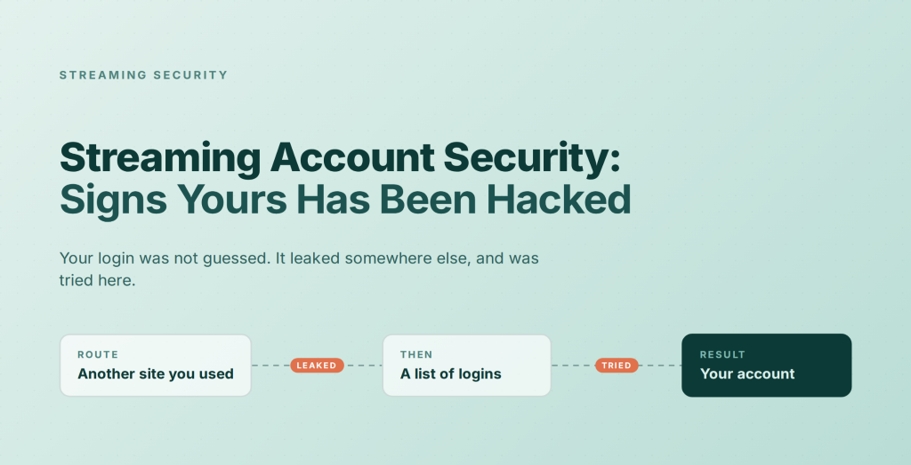
In the movies, someone gets into your account by typing very fast while a progress bar fills up. In life, nobody types anything. Your login was written down somewhere else months ago, sold in a batch of several million, and tried against a dozen services until one of them opened.
That gap is why most streaming account security advice lands in the wrong place. It tells you to build a stronger password, when the problem is where that password has already been. This piece covers what the evidence shows about how these accounts change hands, the signs worth acting on, and the order to work through when someone else is watching on your dime.
The Movies Got This Part Wrong
Screen hackers work against resistance. There is a countdown, a locked system, someone leaning over a keyboard. The drama comes from the fight.
Real account takeovers have no fight in them, because the credentials arrive already readable.
The exposure here is broad. ACMA research published in March 2026 found that 68 per cent of Australian adults used a paid subscription streaming service during 2025, and that 91 per cent watched video through an online service in a given week. Most households now hold several of these logins, and they tend to be built on one email address.
Kaspersky measured the scale of it. In 2024, more than seven million sets of streaming credentials turned up in leaked data, including 5,632,694 for Netflix and 680,850 for Disney+. The researchers were specific about the source: these were not taken out of the platforms’ own systems. They were collected as part of wider credential theft campaigns, then bundled and sold on.
So the question worth asking is not who got into Netflix. It is where else you have used that email address and that password.
This also sorts out what the tools on your devices are for. A free VPN encrypts the connection between your device and the network it is sitting on, which is what you want when you sign in from a cafe, an airport or a rental apartment. The same applies to a free VPN for iPhone on the handset you open these apps on most. Neither one reaches a password that leaked from a shopping site two years ago. Different route, different tool.
Signs Your Streaming Account Has Been Hacked
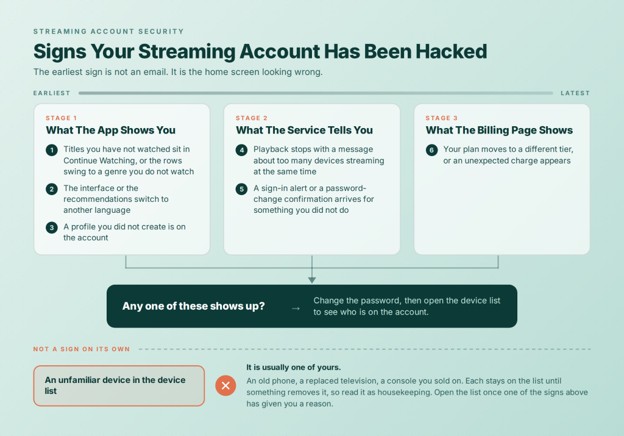
The earliest sign is not an email. It is the home screen looking wrong.
The Signs Worth Acting On
Roughly in the order they tend to show up:
- Titles you have not watched appear in Continue Watching, or the recommendation rows swing towards a genre you do not watch. The algorithm reports the intruder before the notification system does.
- The interface or the recommendations switch to another language.
- A profile you did not create is sitting on the account.
- Playback stops with a message about too many devices streaming at the same time.
- A sign-in alert or a password-change confirmation arrives for something you did not do.
- Your plan moves to a different tier, or an unexpected charge appears on the billing page.
The One That Usually Isn’t A Sign
An unfamiliar device in the account’s device list is usually yours. Old phones, a replaced television, a console you sold on, a screen you signed into once on holiday: each stays on that list until something removes it. Read a strange entry as housekeeping rather than evidence, and go looking at the device list when one of the signs above has already given you a reason.
How Streaming Accounts Actually Get Taken
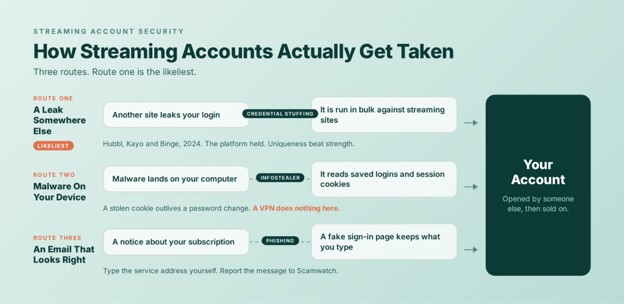
Three routes account for most cases, and route one is the likeliest.
Route One: The Password Leaked Somewhere Else
Attackers buy lists of email and password pairs harvested from other services, then run them against streaming platforms in bulk. Every pair that opens something becomes an account for sale. The technique is called credential stuffing, and it requires no knowledge of you.
Australia has a clean example of it. Between 18 March and 17 April 2024, Hubbl, Kayo and Binge were hit by exactly this. Foxtel described the incident as unrelated to the company’s systems, and reminded customers to keep passwords “strong, unique, and not shared”.
Read that statement closely. The platform held. What gave way was a password that had been used somewhere else. Strength was not the variable. Uniqueness was.
Route Two: Malware On The Computer You Sign In From
Kaspersky’s point about where those seven million credentials came from leads to the second route: they were harvested, not extracted. An analysis of the underground datasets traced the credentials it found back to infostealer infections on people’s own machines, trojans that read saved logins straight out of the browser.
These programs take more than passwords. They take session cookies, and a stolen cookie can keep an open session running after the password has changed. That is why a password change on its own settles less than people expect.
A VPN does nothing about this route. It protects traffic in transit, not a device that is already infected.
Route Three: An Email That Looks Right
Fake streaming notices have targeted Australian inboxes for years. The script is consistent: your subscription is about to lapse, your payment did not go through, your account is due for suspension. The link leads to a sign-in page that looks like the real one and records what you type into it.
One rule works better than hunting for tell-tale errors, because the good fakes have stopped making them. Treat every link in a message about your account as unusable. Type the service’s address into the browser yourself and look for the same notice inside your account page. If it is not there, the email was fake.
Suspicious messages can be reported to Scamwatch, which the ACCC runs.
Matching the defence to the route is most of the work:
| How The Login Was Taken | What Stops It | What Does Not |
| A reused password tried across services | A different password on every account | A stronger password |
| Infostealer malware on your computer | Clearing the device, then a password change and a full sign-out | A VPN; a longer password |
| A phishing email with a fake sign-in page | Typing the address yourself instead of clicking | Spotting the obvious tells |
| Someone reading traffic on a shared network | An encrypted connection | Anything done after the fact |
What To Do, In Order
The order matters more than the list does. Step two is the one people skip, and skipping it undoes step one.
- Change the password on the service’s own site. Type the address yourself rather than using a link from an email about the problem.
- Sign out of every device at the same time. A password change does not reliably end sessions that are already open, and route two runs on that exact gap. Netflix keeps this on its Manage Access And Devices page, which lets you drop a single device or clear every one of them in a single action.
- Find the other places that password has been used. This is the root of it. Any account still sharing those credentials is the next entry point, and the streaming account was probably a symptom rather than the cause.
- Check the billing page. Look at the plan tier and the recent charges, not only the password.
- Check the computer you sign in from. When route two is what happened, account-side work changes nothing until the machine is clean. Run a full scan with the security software already on the device, and read the browser’s saved-password list as a set of things to change rather than as a convenience to restore.
- Turn on whatever extra sign-in verification the service offers. Not every streaming platform has one, which is why the device list carries more weight here than it does for your email.
- Report it. Use the service’s own channel, and send a phishing email on to Scamwatch as well.
What A VPN Does Here, And What It Doesn’t
A VPN does not stop route two. If something on your laptop is reading your browser, an encrypted tunnel carries the stolen data out more privately and changes nothing else. It also cannot undo a password you used on four other sites.
Three things it does do, and each is narrower than the marketing around this category suggests.
It protects the sign-in itself on a shared network. Cafes, airports, hotels and rental apartments put you on a segment with people you cannot see. X-VPN encrypts that traffic with AES-256-GCM and uses TLS 1.3 with ECDHE for forward secrecy. Its DNS, IP and WebRTC leak protection runs by default on the free and paid tiers alike, so there is no switch to remember.
It can tell you when your address surfaces in a leaked dataset. This is the part that meets the problem described in this article. X-VPN’s Dark Web Monitor lets you bind up to five email addresses and checks them against leaked datasets on an ongoing basis. The feature sits on the Premium Windows app. The free tiers cover the connection, not the monitoring.
It blocks some of the destinations phishing pages depend on. Ad and tracker blocking is a paid feature and its platform coverage varies, so treat it as a second layer rather than as the answer to route three.
X-VPN’s no-logs policy was independently audited in 2026 under the ISAE 3000 (Revised) assurance standard.
Before You Share The Login
Sharing a streaming account hands over more than a place to watch. The other person can see the viewing history, the email address the account is built on, the last digits of the payment method, and the password reset page.
The number of screens an account lives on is the number of sessions that can outlast their welcome. A television at a holiday rental. A flatmate who moved out. A console that changed hands.
Two habits make a shared account manageable. Give it a password used for that account and nothing else, so a leak there stays there. Then read the device list every few months and remove what no longer belongs.
Frequently Asked Questions
What Are The Signs Your Streaming Account Has Been Hacked?
Titles you did not watch in Continue Watching, recommendations in another language, a profile you did not create, playback blocked for too many devices, and sign-in alerts you did not trigger.
Is Someone Else Using My Netflix Account?
It happens quietly. The recommendation rows tend to shift before any alert arrives, so check Continue Watching and the profile list, then open the device list.
Was The Platform Hacked, Or Was It Me?
Usually neither. The password leaked from a different service and was tried against this one. Foxtel said as much after the 2024 attempts on Hubbl, Kayo and Binge.
Does Changing My Password Sign Everyone Else Out?
Not reliably. Open sessions can survive a password change, so sign out of every device as a separate step.
Will A VPN Stop My Streaming Account From Being Hacked?
No. It encrypts the connection between your device and the network, which protects a sign-in on shared Wi-Fi. It does nothing about a reused password or malware on your computer.
Two Habits Worth Keeping
One thing to do today: work out where else that streaming password has been used, and change it in those places. One thing to keep for later: when the home screen starts recommending films in a language you do not read, change the password and then sign out of every device, in that order. Streaming account security comes down to those two habits more than to anything you can install.
