




by Bronte Carter
If you’re a YouTuber, vlogger, or course creator, you probably know the heartbreak of seeing your big, beautiful widescreen video lose its magic when chopped into a tiny portrait format. That cinematic landscape shot? Cropped in half. Your carefully framed talking head? Off-center and covered by icons. Ouch.
But here’s the good news: with a smart video resizer, you don’t have to choose between polished long-form videos and short-form content that pops on Stories, Reels, and TikTok. Platforms crave vertical videos — and your audience wants bite-sized versions of your best work. So let’s turn that widescreen gold into scroll-stopping vertical stories, one smart crop at a time.
By the way, Pippit is your best buddy if you want to make this simple (and enjoyable). It’s a handy toolkit that takes your widescreen edits and reshapes them for any feed, without the heartbreak of losing your best moments.

Why repurposing wide videos is pure gold
You spent hours filming that 10-minute YouTube tutorial. Why let it sit on one platform? That same video can become:
- A teaser Reel to hype your channel.
- A punchy TikTok with subtitles.
- An Instagram Story with swipe-up links.
- A paid ad that looks native, not forced.
Long-form to short-form is the ultimate content hack. But the key is to make sure every cropped frame still flows and feels intentional. And that means getting serious about resizing, reframing, and — when needed — learning how to crop video online without losing context or quality.
The portrait problem: what gets lost in translation
Horizontal videos give you space to breathe: wide shots, scenery, text, and multiple subjects. But the second you move to 9:16 portrait, your real estate shrinks. Suddenly:
- Text overlays can fall off the screen.
- Side elements get cut off.
- Your main subject is awkwardly off-center.
It’s like squeezing a movie theater onto a phone screen. That’s why so many Reels look choppy or feel unfinished — they weren’t resized with the final format in mind.
Find the sweet spot: keep your story flowing
A smart video resizer (like Pippit) does more than just squeeze your footage into a new shape. It helps you:
- Reframe your shots: Drag your focal point into view so your face or product stays front and center.
- Crop with care: When you crop video online, you’re deciding what stays in the spotlight.
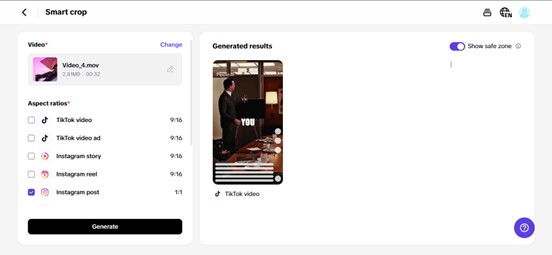
- Preview in real time: See exactly how your new portrait cut will look on different platforms before you hit export.

Clip, stack, and remix: long-form to micro-moments
Repurposing doesn’t mean mindlessly cutting your video into 15-second bits. The best creators treat it like storytelling:
- Teasers: Pull the juiciest moment from a vlog and frame it as a cliffhanger for your full video.
- How-tos: Grab step-by-step segments and turn them into bite-sized Stories.
- Quotes & hooks: Use text overlays to highlight your best one-liners and make them loop-friendly.
When you plan these slices upfront, you get more mileage from every shoot, without needing to film new content every week.
Cropping for vertical: the magic of safe zones
Here’s a pro tip: Safe zones aren’t just for captions. When you crop video online, you also need to watch for:
- Platform overlays: Likes, comments, and share buttons love to cover your visuals. Keep your hooks and text away from those corners.
- Faces and gestures: Your body language sells your story — but only if viewers can actually see it.
- Brand elements: If you’re adding a logo watermark, make sure it stays visible no matter the crop.
A good video resizer lets you tweak your framing again and again until it feels natural.
Test your flow: not all clips are equal
Not every clip from a widescreen vlog will shine in portrait mode. So be picky! Ask:
- Does the clip stand alone?
- Will it make sense without extra context?
- Does it loop well, if you’re posting on Reels or Shorts?
Sometimes the best bits come from the middle, not the intro. With Pippit, you can trim, test, and preview until you find your flow.

Your visuals deserve to stay crisp
Worried about fuzzy, pixelated exports? We get it — nothing kills your credibility faster than a blurry Reel. That’s why your resizer should handle:
- Resolution control: Keep your HD quality, even when you crop and reframe.
- Platform-ready ratios: Export in the right dimensions for each platform — no weird black bars.
- Lossless exports: No more ugly compression artifacts.
Your widescreen masterpiece deserves to shine, no matter how tall or short it gets.
Pippit: widescreen wizardry, story-sized
Here’s the best part — you don’t have to juggle a dozen clunky apps or guess where your text might get cut. Pippit’s smart video resizer takes your widescreen edits, helps you crop video online exactly where it counts, and spits out Reels, Stories, or Shorts that look like you filmed them vertically all along.
Want to try it? Just drag in your video, pick your aspect ratio, and slide your framing until it feels just right. Pippit’s real-time preview means no nasty surprises when you hit upload.
Repurpose like a pro
Think of it this way: you’re not just resizing a video — you’re repackaging your story for every possible audience. One vlog could become:
- A dozen Reels teasing different takeaways.
- A Story series that builds hype for your channel.
- An ad that feels native to the feed.
All without filming a single new frame.
Ready to resize your reach?
Your widescreen footage is packed with gold — don’t let it gather dust in one corner of the internet. With the right video resizer and a little smart cropping, you can transform every minute into multiple story-driven moments that hook new fans, build your brand, and keep your content alive.
So next time you wrap up an epic vlog or long-form video, don’t just hit publish and walk away. Fire up Pippit, slice it up, crop it right, and share it everywhere your audience loves to scroll.
Ready to give your widescreen stories a second life? Try Pippit today and see how easy it is to resize, crop, and repost your way to more views.
Image by Gerd Altmann from Pixabay
