




by Ronan Drake
In today’s fast-paced world, videos have seamlessly woven into the fabric of our lives, capturing treasured memories and serving as powerful communication tools across diverse industries. As technology marches forward, our expectations for video quality rise in tandem. In this quest for excellence, the revolutionary Video Upscaler stands as a shining example of the boundless potential of artificial intelligence in reshaping video enhancement. Over the years, various tools have emerged to aid users in performing simple yet essential tasks, such as speech-to-text conversion, free online video editor, editing, enhancement, and more. Among these, the Video Upscaler has emerged as a true game-changer, offering the promise of upscaling videos to mesmerizing 4K resolution while elevating their overall visual appeal. In this article, we embark on an enlightening journey into the intricacies of the remarkable Video Upscaler, uncovering the advanced algorithms that drive this cutting-edge technology.
The Evolving Landscape of Video Enhancement
Video upscaling and enhancement have long presented considerable challenges, with traditional methods often resulting in a loss of quality and the introduction of artifacts that leave viewers dissatisfied. However, the rise of artificial intelligence and machine learning has led to a transformative shift in this landscape.
Leveraging the Power of Advanced AI Algorithms
At the forefront of video enhancement, the Video Upscaler harnesses the power of cutting-edge AI algorithms, enabling users to upscale their videos to 4K resolution without compromising on visual clarity. Unlike conventional approaches, this AI-driven solution utilises deep learning to achieve unparalleled results.
Empowering Video Upscaling with Deep Learning
Deep learning, a subset of machine learning, has revolutionised various fields, including computer vision and natural language processing. When applied to video upscaling, deep learning models can understand complex patterns and details, even from low-resolution source material.
CapCut’s AI model is trained on vast datasets of high-resolution and low-resolution videos from diverse genres. During the training process, the AI system learns to identify patterns, textures, and structures critical for preserving video quality. This enables the AI to predict and synthesize missing information, effectively transforming lower-resolution videos into stunning 4K masterpieces.
Precise Blurriness Removal: Enhancing Video Clarity
Blurriness often plagues videos due to factors such as camera shake, low light conditions, or optical imperfections. Deblurring video is a complex task that requires sophisticated algorithms to identify and rectify blurry regions accurately.
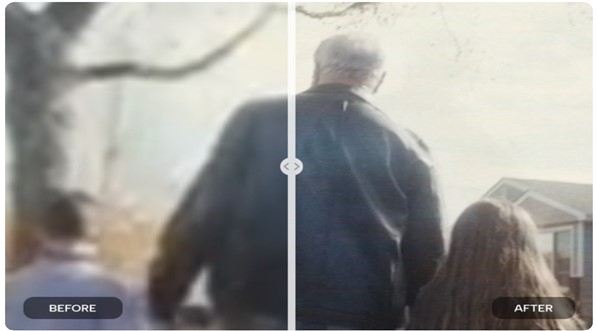
CapCut’s Video Upscaler employs advanced image deblurring techniques powered by AI. By analysing motion patterns and understanding the blurring kernel, the AI can reverse the blurriness effect, restoring the original sharpness. The result is a clearer, visually appealing video that retains its natural details.
The Art of Detail Injection: Enhancing Authenticity
Merely increasing the pixel count for upscaling can lead to a loss of fine details and authenticity in the final output. The tool takes video enhancement to a higher plane by injecting original details into the upscaled video.
Using deep learning and pattern recognition, the AI model identifies areas requiring additional details. By analysing high-resolution references, the AI reconstructs these areas with lifelike details, ensuring that the video looks not only sharper but also natural and true to the original scene.
The One-Click Feature
The tool boasts user-friendly simplicity. While the technology behind it is intricate, the user experience remains remarkably straightforward. With just one click, users can initiate the video enhancement process.
Behind the scenes, AI algorithms work diligently to analyse the video, upscale it to 4K resolution, deblur it, and add missing details. This streamlined process saves users time and effort, making advanced video enhancement accessible to a broader audience.
Video Upscaler: Your All-in-One Solution
The Video Upscaler is a cutting-edge tool designed to enhance videos across diverse contexts. Whether you have cherished memories captured in old home videos, low-resolution footage from past events, or professional content in need of a quality boost, this AI-powered tool has got you covered.
From preserving family moments that last a lifetime to polishing business presentations and marketing materials, the video upscaler ensures every video shines with enhanced clarity and realism. Its unparalleled versatility makes it an invaluable asset for content creators, businesses, educators, and anyone seeking to elevate their video content to new heights.
A Colourful Era of Video Enhancement
The ever-evolving landscape of AI technology promises exciting possibilities for video upscaling and enhancement. CapCut’s Video Upscaler stands as a testament to the immense potential of AI-driven solutions in the world of video content. As AI algorithms continue to advance, we can look forward to even more remarkable advancements in video quality, delivering unparalleled visual experiences for content creators and captivating storytelling for video consumers. The Video Upscaler is just the beginning of an extraordinary journey towards a future where video enhancement reaches new heights.
With the power to upscale videos to 4K resolution without compromising quality, deblur images, and inject original details, the video upscaler represents a significant stride forward in video enhancement technology. As these AI algorithms evolve further, we can eagerly anticipate even more impressive advancements in video quality, unlocking new creative horizons for content creators and delivering immersive experiences for video consumers.
A Simple and User-Friendly Guide to Using Video Upscaler
Step 1: Access the Video Upscaler
Begin by visiting CapCut’s official website and locate the Video Upscaler tool.
Step 2: Upload Your Video
Upload your video by either dragging and dropping the file or clicking the “Upload” button to select it from your computer.
Step 3: Choose Upscaling Option
Find the “Upscale” button or bar, typically near the video preview. Click on it to initiate the upscaling process for your video.
Step 4: Wait for the Processing
After clicking “Upscale,” the tool will start processing your video, which may take a few minutes based on its length and complexity.
Step 5: Download the Enhanced Video
Once the process is complete, the video preview will display the enhanced version. Look for a download button/icon at the bottom right corner of the preview and click it to save the enhanced video.
Step 6: Select Destination Folder
Choose a folder or location on your computer to save the enhanced video.
Step 7: Review and Enjoy
Before sharing or using the upscaled video, take a moment to review it and ensure you’re satisfied with the improvements. Now, your enhanced video is ready to be enjoyed and shared!
Conclusion
The remarkable technology behind the Video Upscaler demonstrates the vast potential of artificial intelligence in transforming video enhancement. Through the integration of deep learning, image deblurring, and detail injection, this advanced tool empowers users to upscale videos to 4K resolution while elevating their visual appeal. Its user-friendly one-click enhancement process and ability to process diverse video types open doors to immersive video experiences. As AI technology advances, the horizon expands, promising even greater possibilities for enhancing video quality and captivating visual storytelling.
