




by Constance Fan
Not every photo turns out the way you hoped. Sometimes it’s blurry or dark. And sometimes? It just looks… flat.
Most of us don’t open Photoshop to fix those problems. We either live with them or forget about the photo altogether.
But not me. I had some memorable pictures from 2022 (but in poor quality). So, I decided to do something about it. That’s when Wink had my attention.
It promises to improve digital assets with just a few taps. No complicated editing. Just upload your file and let AI do its job.
I’ve tried a handful of AI editing apps over the past year. Some were genuinely useful. Others made every image look too processed.
So, I wanted to see where Wink landed. Over the past few days, I used it on a mix of everyday photos to see how it handled real problems, not carefully staged marketing images.
Here’s what I liked, what could be better, and whether it’s actually worth downloading.
Why This Was a Tough Test for Any AI Tool
I already knew these weren’t easy files to fix. Some photos were taken as far back as an old phone. Others had been shared over WhatsApp a few times.
Eventually, this noticeably reduced their quality.
One landscape was captured just before sunset, so there simply wasn’t enough light for the camera to work with.
Each file had a different problem. Some had poor lighting. Others had a slight camera shake.
A few had lost quality because of compression after being shared multiple times.
These aren’t issues you can always solve with a regular photo editor. That’s what made this a real challenge for AI. Could it recover details that looked lost?
How to improve an image using Wink AI
I picked an evening shot from a trip I took in 2022. The lighting was not ideal. Plus, my phone camera struggled to capture the scene the way I remembered it. The biggest issue wasn’t the sharpness. It was the colours.
The hills should have looked rich and green. But as you can see, most of the vegetation blended together. The purple flowers scattered across the hillside barely stood out. They were one of the first things I noticed.

The image also lacked depth. Everything looked a little flat. That’s the kind of photo I wanted to test.
If Wink could recover those colours and add a little more definition without making the image look fake, I’d consider that a success.
I used Wink’s AI image enhancer to enhance the image quality.
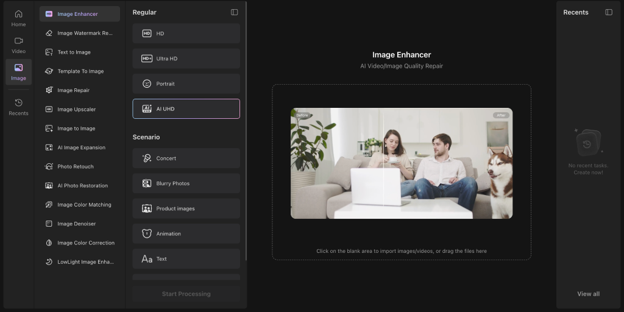
I used AI UHD mode here because the photo needed more resolution, not just more clarity.
A regular enhance sharpens what’s already there, but won’t add pixels the original never captured.
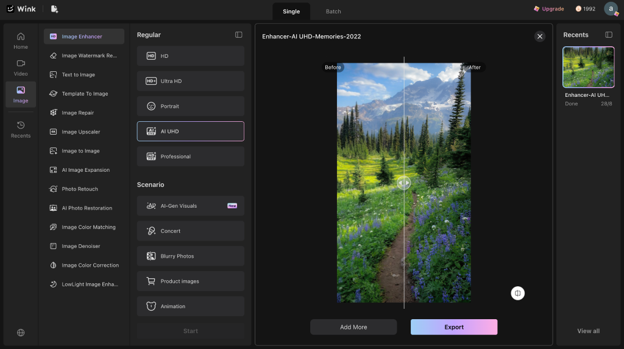
I got the final result within 90 seconds.
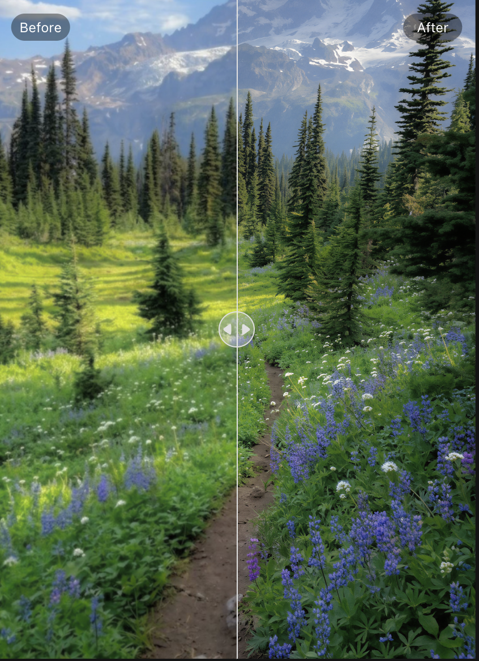
The hills finally looked greener. Instead of blending into one dark patch, you could see different shades across the landscape. This is something most AI tools don’t get right.
The purple flowers also stood out much better. They added colour to the scene instead of disappearing into the background.
I noticed more texture on the rocky cliff, too. It gave the photo a greater sense of depth. The lighting looked more balanced. Brighter, but not overdone.
Most importantly, the image still felt natural. It looked like the same photo, just a much better version of it.
What Else Can Wink Do?
I spent a little more time exploring the app. It quickly became clear that image enhancement is only one part of it. One thing I genuinely liked about Wink was how organised everything felt.
Most apps simply give you an “Enhance” button.
Wink takes a different approach. It separates the tools based on your problem.
Fixing an old photo is different than fixing a noisy image. It separates these tasks into dedicated tools. This makes it much easier to choose the right one instead of guessing which feature might work best.
That small detail made the editing experience feel more intuitive.
Wink also includes tools for:
- Restoring old photos.
- Enhancing videos.
- Reducing noise.
- Removing watermarks.
If you’re someone who edits different types of content. Why? Because it’s useful to have those options in one place. I also noticed portrait editing features for simple images. Although I didn’t test those for this review.
For me, the biggest takeaway wasn’t the number of tools. But quality results. It had different ways to improve photos and videos without switching between multiple apps.
How Wink Compares to Other AI Photo Editors.
There isn’t a single AI photo editor that’s best at everything. Some are better for restoring old memories. Others focus on portraits, creative edits, or professional workflows.
After using Wink, I think it fits somewhere in the middle. It isn’t trying to replace desktop editing software or generate completely new images. Instead, it focuses on improving photos and videos that already have potential but need a little help.
If that’s what you’re looking for? Wink is a practical option.
| Tool | Best for |
| Wink | Quick AI enhancement for photos and videos |
| Photoshop | Professional editing and full manual control |
| Remini | Face enhancement and portrait restoration |
| Canva | Design and simple photo edits |
| Google Photos | Basic everyday adjustments |
Where I Think Wink Works Best
I realised where Wink fits best. It isn’t for rebuilding badly damaged photos from scratch.
It’s for improving images that already have a good memory behind them, but didn’t turn out the way you expected.
Think travel photos with poor lighting. Old family pictures. Or everyday shots that have lost quality over time. For those kinds of images, I think it works well. I’d probably use Wink for:
- Restoring old family photos that have faded over time.
- Improving travel photos taken in poor lighting or bad weather.
- Enhancing low-light phone photos that look darker than the real scene.
- Cleaning up short videos before posting them on social media.
- Bringing back colours in photos that appear dull or flat.
- Reducing noise in images captured at night.
- Making product photos look clearer for online listings or small business pages.
Parting Comments
After spending a few days with Wink, I came away with a positive impression. What stood out most wasn’t how much it changed my photos. It was how naturally it did it.
The edits didn’t feel overdone. They felt believable.
I also liked that the app offers different tools for different problems rather than treating every photo the same. That made the whole editing process feel more intuitive.
Will it fix every photo? Perhaps, yes. Some images simply don’t have enough information to recover.
But if your goal is to improve everyday pictures that didn’t turn out the way you expected, Wink is well worth trying.
For me, it turned a photo I had almost forgotten into one I’d happily keep again.
